
Staff Answer
Jun 05, 2026 - 01:47 PM
Google supports Conversational Attributes which now includes product questions and answers, where merchants can feed to Google Merchant Center all of the FAQs related to products that are in their feed. Answerbase can provide you with that feed that Google can use to ensure that Google Merchant Center has what it needs as far as the question and answer content related to all of your products as an ecommerce merchant.
How do you add question and answers to your Google Merchant Center Feed?
We'll show you all the steps below.
First Step, Add the "Advanced data source management" Add On
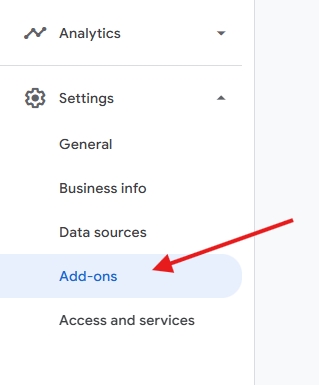
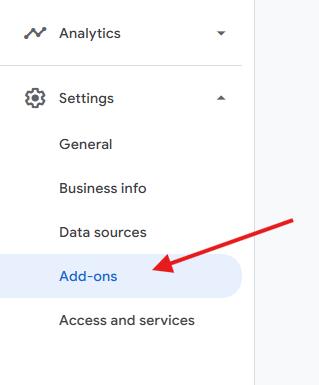
Within Google Merchant Center, Google recommends that you add the question and answer product data by utilizing a "Supplementary Data Source" (which Answerbase powers for you)....and in order to leverage this you'll want to go into Google Merchant Center and then go to "Add Ons" as you see here:
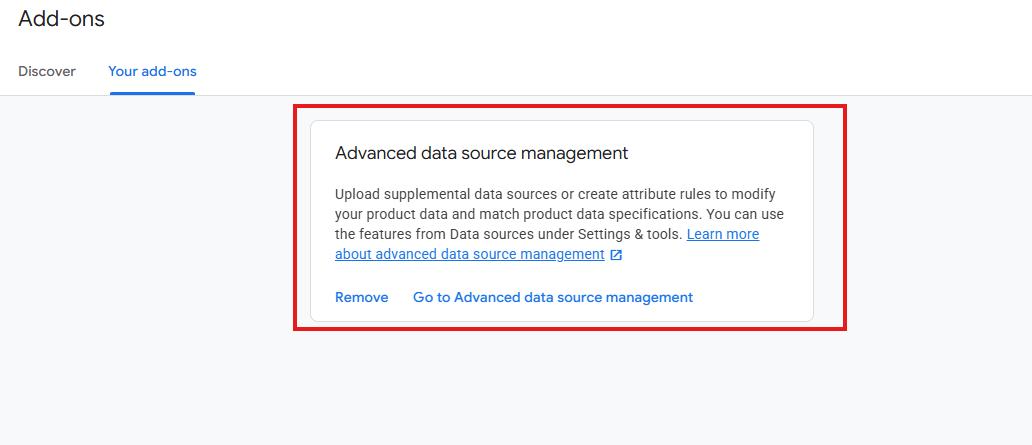
Then...you'll want to add the "Advanced data source management" option as you see here:
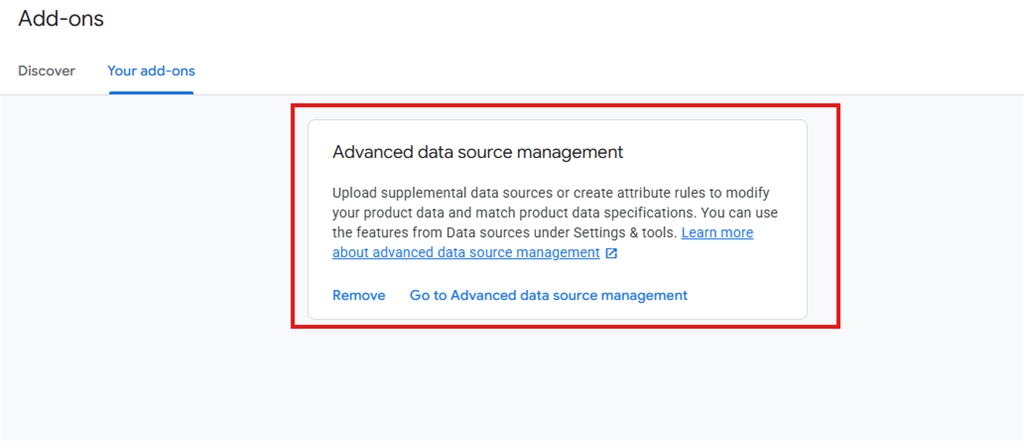
So....go ahead and add that to your Google Merchant Center account...and then you'll be ready to identify your product question and answer data.
Second Step, Add New Supplementary Data Source with Product Question & Answer Content
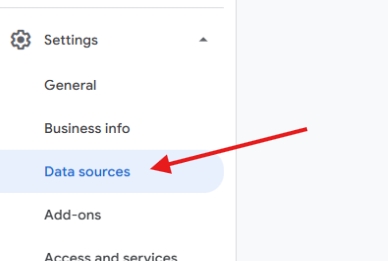
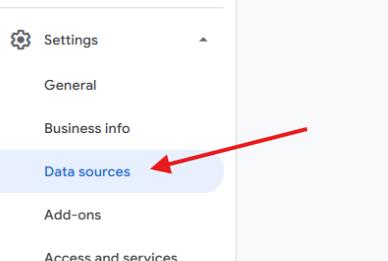
In your Google Merchant Center, go to "Data Sources" as seen here:
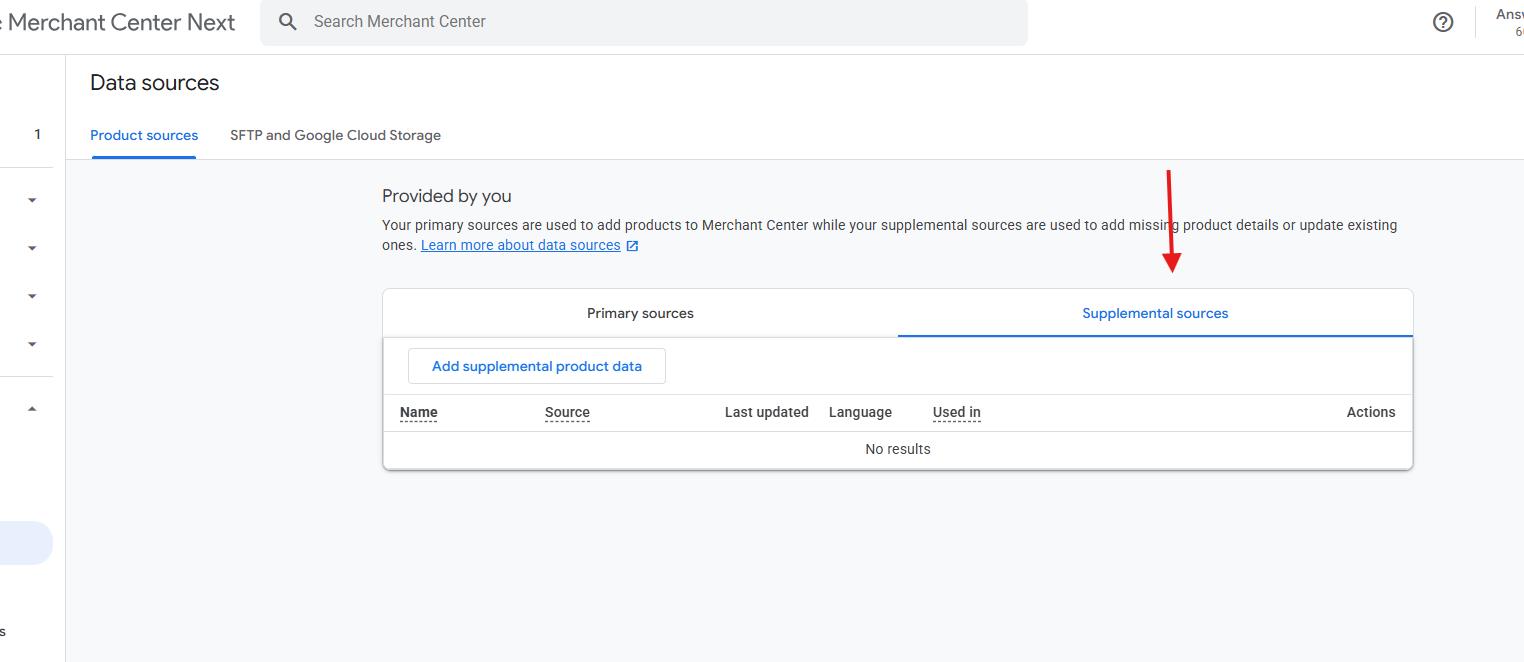
Because you've enabled the Add On we mentioned above....you'll see the option for "Supplemental sources" as seen here:
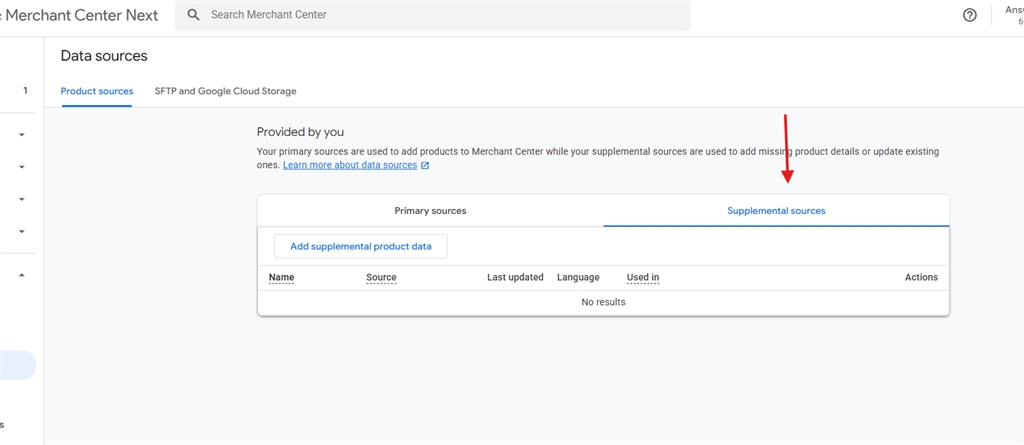
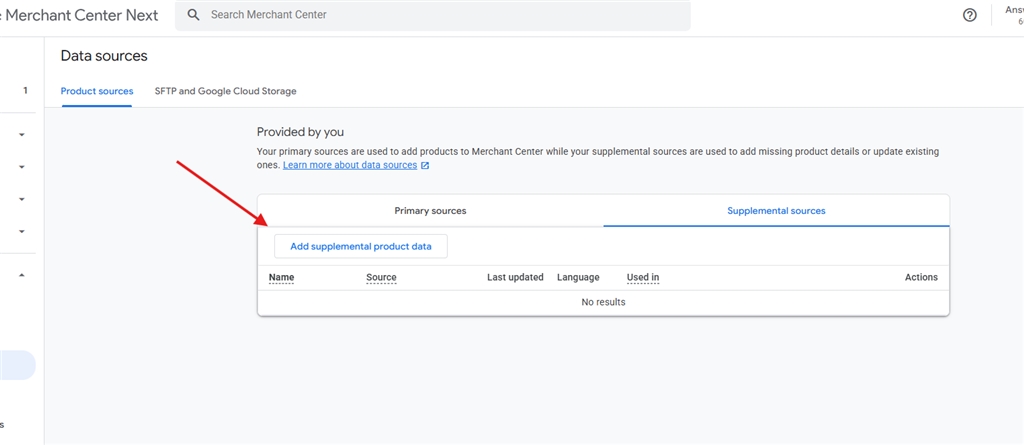
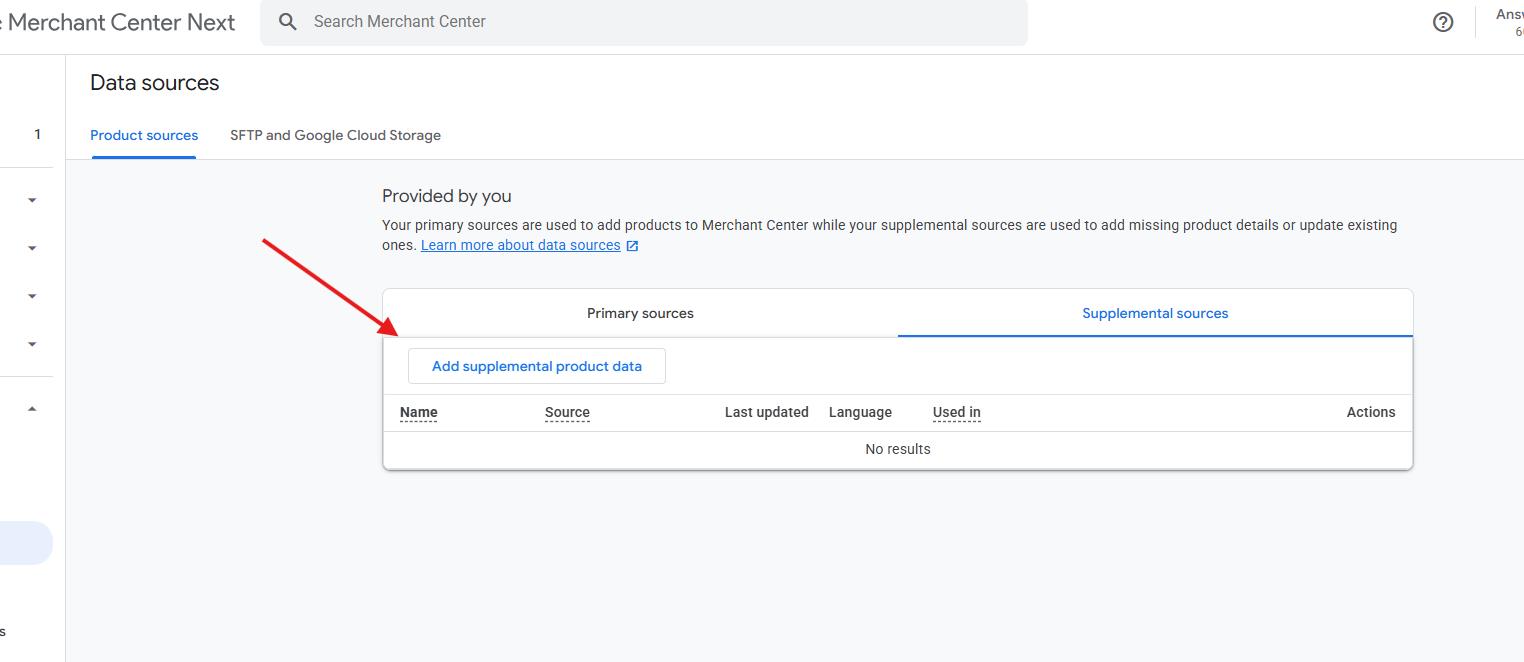
and then click the "Add supplemental product data" button option as you see here:
Now, it gives you various options on how to give Google your product question and answer data....but the easiest way to both provide that product question and answer data and keep it maintained over time is to use the "Enter a link to your file" and let Answerbase power that for you. Answerbase recognizes what the most valuable Q&A pairs are for each of your products based off of real search demand and customer engagement data.....so you're "frequently asked questions" that you feed to Google are actually "Frequently Asked". This is important because Google uses this question and answer content in order to better service ecommerce customers through AI as customers are asking all of their pre-purchase questions and utilizing AI in order to get those answers. Answerbase enables you to do this effectively for thousands of products efficiently, and keeping your Google Merchant Center feed up to date with the questions and answers content.
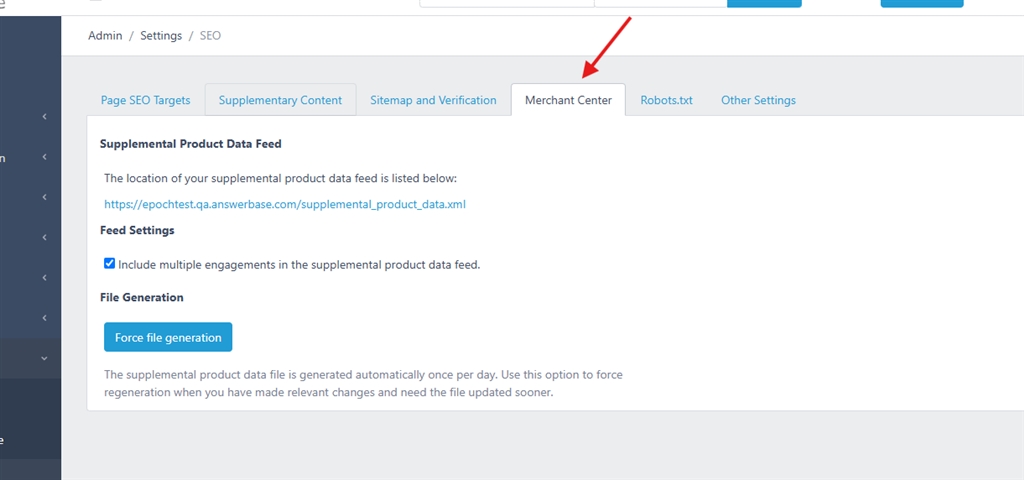
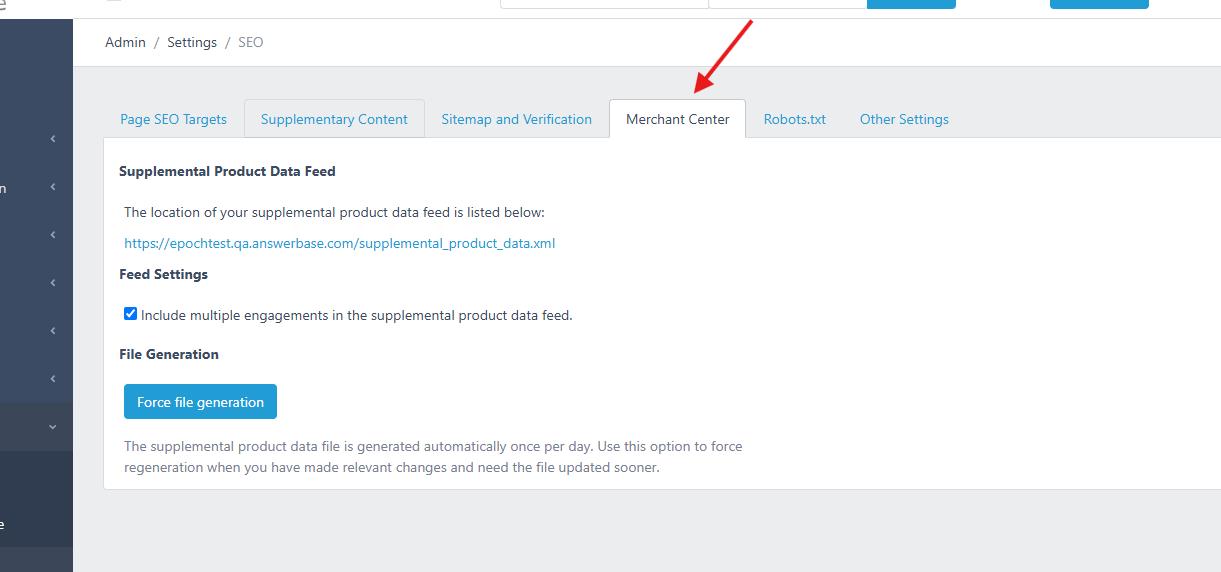
If you're an Answerbase customer, you can find this supplemental data feed in your settings under "System Settings > SEO" and you'll see a "Merchant Center" tab as shown here:
If you need a solution to power the product question and answer content for these purposes, Schedule a Call and our team will make sure you're taken care of.
How do you add question and answers to your Google Merchant Center Feed?
We'll show you all the steps below.
First Step, Add the "Advanced data source management" Add On
Within Google Merchant Center, Google recommends that you add the question and answer product data by utilizing a "Supplementary Data Source" (which Answerbase powers for you)....and in order to leverage this you'll want to go into Google Merchant Center and then go to "Add Ons" as you see here:
Then...you'll want to add the "Advanced data source management" option as you see here:
So....go ahead and add that to your Google Merchant Center account...and then you'll be ready to identify your product question and answer data.
Second Step, Add New Supplementary Data Source with Product Question & Answer Content
In your Google Merchant Center, go to "Data Sources" as seen here:
Because you've enabled the Add On we mentioned above....you'll see the option for "Supplemental sources" as seen here:
and then click the "Add supplemental product data" button option as you see here:
Now, it gives you various options on how to give Google your product question and answer data....but the easiest way to both provide that product question and answer data and keep it maintained over time is to use the "Enter a link to your file" and let Answerbase power that for you. Answerbase recognizes what the most valuable Q&A pairs are for each of your products based off of real search demand and customer engagement data.....so you're "frequently asked questions" that you feed to Google are actually "Frequently Asked". This is important because Google uses this question and answer content in order to better service ecommerce customers through AI as customers are asking all of their pre-purchase questions and utilizing AI in order to get those answers. Answerbase enables you to do this effectively for thousands of products efficiently, and keeping your Google Merchant Center feed up to date with the questions and answers content.
If you're an Answerbase customer, you can find this supplemental data feed in your settings under "System Settings > SEO" and you'll see a "Merchant Center" tab as shown here:
If you need a solution to power the product question and answer content for these purposes, Schedule a Call and our team will make sure you're taken care of.
