
How to Connect Answerbase to Your Chat & Ticketing Platform (Gorgias, Zendesk, etc.)
Answerbase can read through your historical customer support communication, identify the pre-sales questions that have been asked and answered and lead to a sale...and then leverage them for what you can publish in order to increase future conversions and grow your organic traffic. The goal is to create an efficient manner of funneling your teams expertise related to your products directly on your site...and published and distributed in a way that Google and AI crawls it and increases your visibility.
In your administration platform, if your plan supports this capability.....go under "Integration > 3rd Party Services" as seen here:
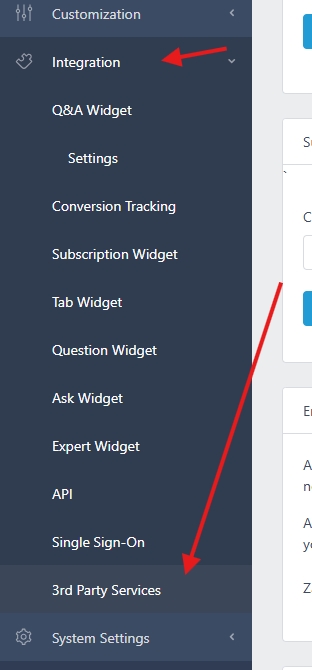
Choose Your Help Platform
Once you arrive on that page, you have an option to select your helpdesk vendor (like Gorgias, Zendesk, etc.) from there....see here:
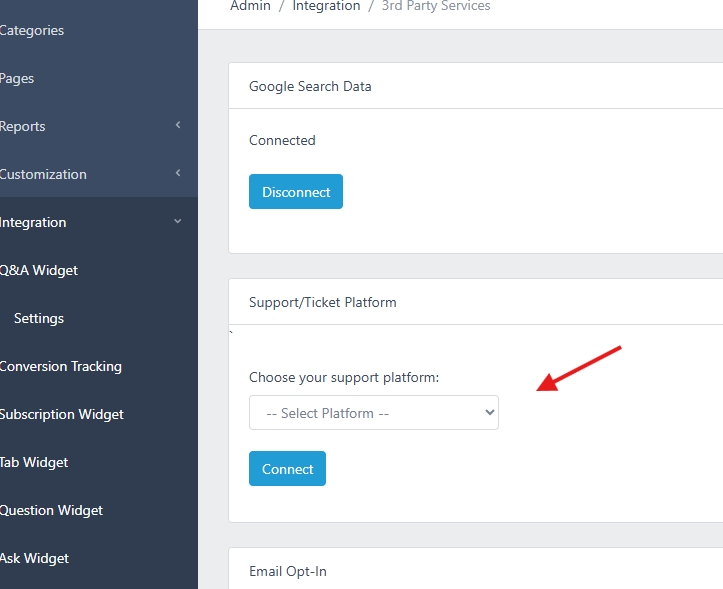
Select your help platform and click the button "Connect".
Identify Your Helpdesk ID
Once you've selected your platform, you'll be asked to identify your help platform ID like this:
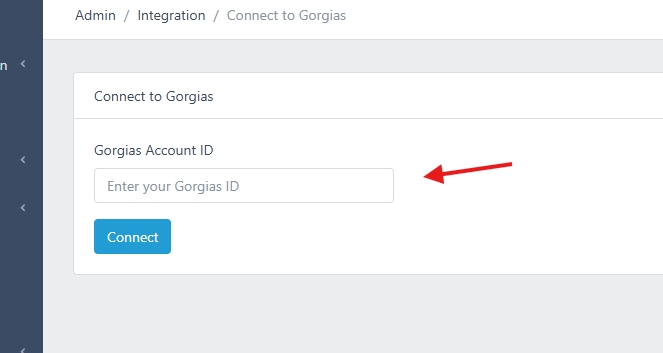
For example...if you use Gorgias....your ID is identified within your Gorgias account URL which is something like this:
yourstorename.gorgias.com
So....you want the value that would be "yourstorename" and enter that into the field...and click connect.
Connecting Your Account to Answerbase
From there, Answerbase will communciate with your help platform and you'll be asked to give us permission to connect....and after that process is completed your Answerbase account will be connected. From there, Answerbase will be able to access relevant communication that you've managed in the past, look for the pre-sales questions that are useful for assisting in future sales, and bring them up for consideration where you'll review any recommendations and can choose to publish them or not. Note that Answerbase will not publish anything without your teams review and approval, it will just go into the normal recommendations processes and workflows, and be introduced for your team's considerations.
In your administration platform, if your plan supports this capability.....go under "Integration > 3rd Party Services" as seen here:
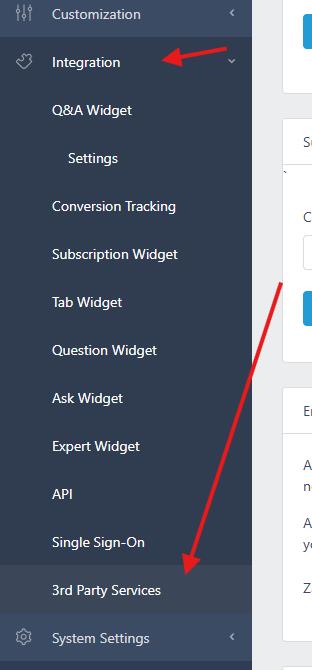
Choose Your Help Platform
Once you arrive on that page, you have an option to select your helpdesk vendor (like Gorgias, Zendesk, etc.) from there....see here:
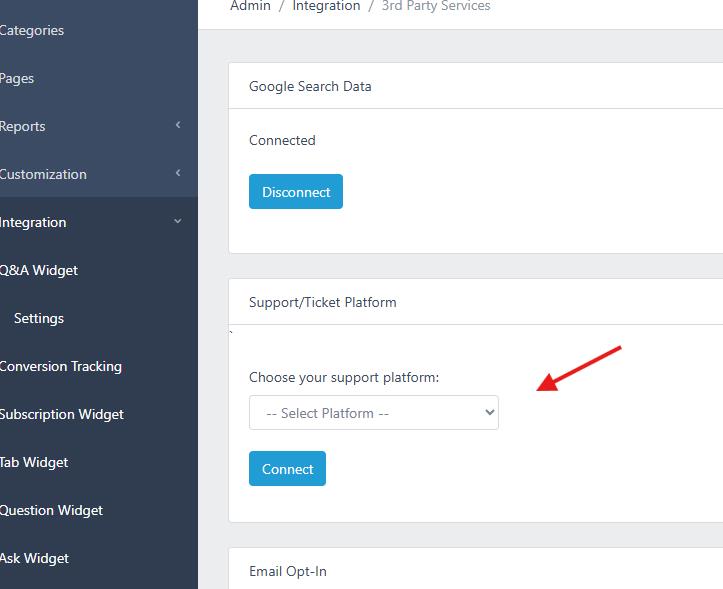
Select your help platform and click the button "Connect".
Identify Your Helpdesk ID
Once you've selected your platform, you'll be asked to identify your help platform ID like this:
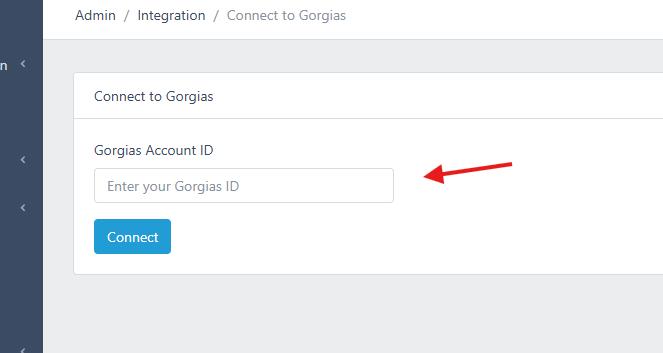
For example...if you use Gorgias....your ID is identified within your Gorgias account URL which is something like this:
yourstorename.gorgias.com
So....you want the value that would be "yourstorename" and enter that into the field...and click connect.
Connecting Your Account to Answerbase
From there, Answerbase will communciate with your help platform and you'll be asked to give us permission to connect....and after that process is completed your Answerbase account will be connected. From there, Answerbase will be able to access relevant communication that you've managed in the past, look for the pre-sales questions that are useful for assisting in future sales, and bring them up for consideration where you'll review any recommendations and can choose to publish them or not. Note that Answerbase will not publish anything without your teams review and approval, it will just go into the normal recommendations processes and workflows, and be introduced for your team's considerations.
