
Answer
Mar 14, 2022 - 12:42 PM
Answerbase can feed you with the questions that are being asked about your products, product categories, as well as other pages within our website where there is a high demand for information that people are consistently asking about on Google. Answerbase can then feed you with those questions so that your team can make sure your site is providing the most valuable answers. In order to get started, you need to connect your Google Search Console account to Answerbase so Google can communicate with us about your site and the search demand related to your pages and content. If you haven't made this connection already, follow these instructions below.
Here is a video that gives you instruction on how to do this:
Step by Step Guide
You can connect Google Search Console by logging into your administration portal and on the top right you'll see the option to connect your Google account as shown here:
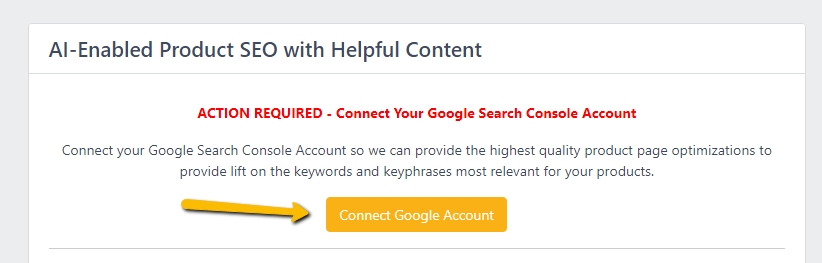
If you don't see that option, you can also go under "Integration > 3rd Party Services" and at the top you'll see the option to connect your Google Search Console Account as seen here:
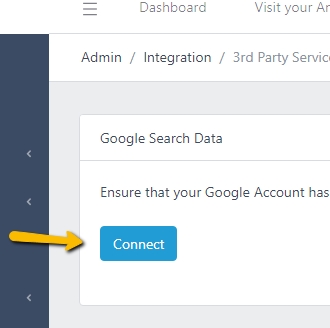
The owner of your Google Search Console account will need to connect there, which will give Google the "ok" so we can communicate with them about search data related to your site and pull those recommendations for you.
This connection gives us the ability to consistently feed you with questions that you KNOW are being asked on Google related to your products and site, where you can ensure that you're providing the best possible answers in order to grow your impressions and clicks on Google searches.
Here is a video that gives you instruction on how to do this:
Step by Step Guide
You can connect Google Search Console by logging into your administration portal and on the top right you'll see the option to connect your Google account as shown here:
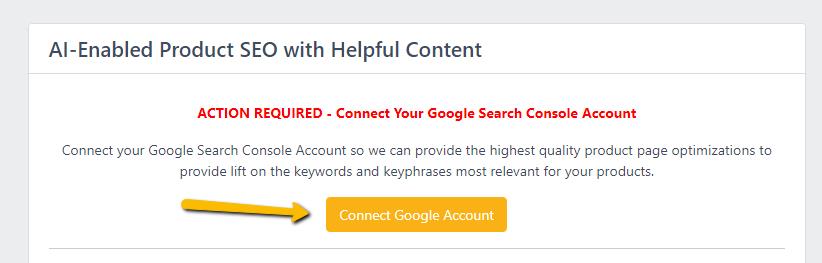
If you don't see that option, you can also go under "Integration > 3rd Party Services" and at the top you'll see the option to connect your Google Search Console Account as seen here:
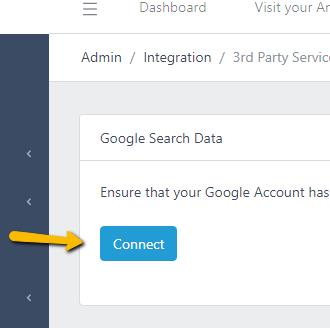
The owner of your Google Search Console account will need to connect there, which will give Google the "ok" so we can communicate with them about search data related to your site and pull those recommendations for you.
This connection gives us the ability to consistently feed you with questions that you KNOW are being asked on Google related to your products and site, where you can ensure that you're providing the best possible answers in order to grow your impressions and clicks on Google searches.
